
To do SEO in 2027, work through six steps in order: make your site easy to crawl and read, map the questions your buyers ask, build pages that answer them first, earn proof on other sites, win rankings and AI recommendations, then measure, refresh and repeat. Each step builds on the one before. The same process now gets you found on Google and named by AI tools such as ChatGPT, Gemini and Google's AI Mode.
This SEO process is written for business owners and marketing managers who want to know what to do, in what order and how to tell when a step is finished. Each step lists the work, the free tools, a rough time estimate and a "done when" check. A made-up example runs through all six: a payroll software company that sells to small businesses.
The SEO process at a glance
SEO is not a one-off project. It is a loop. Steps 1 to 3 build a site that machines can read and buyers can use. Steps 4 and 5 build the reputation that gets you ranked and recommended. Step 6 tells you what to fix next, which takes you back to step 1.
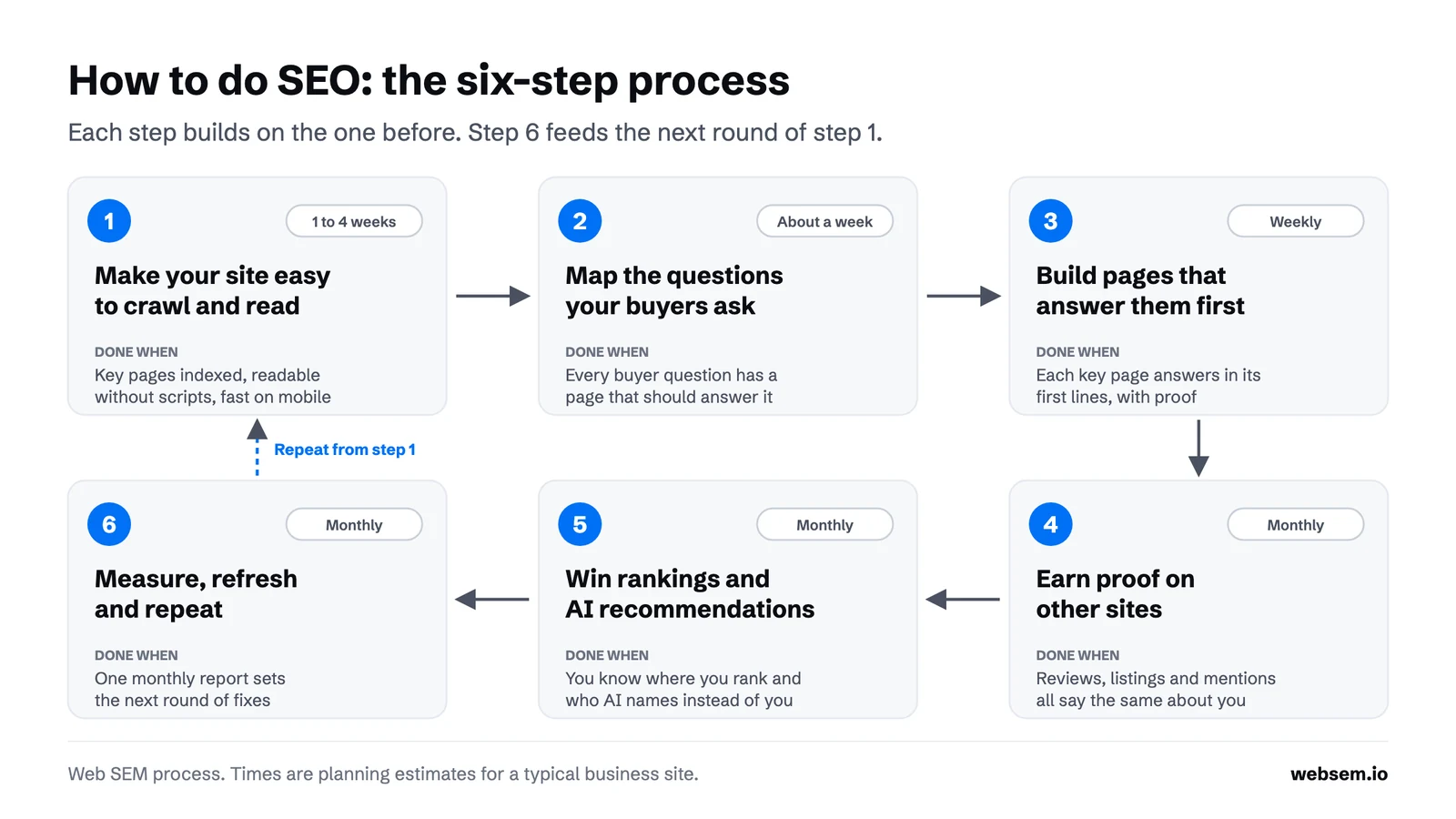
- Make your site easy to crawl and readsearch engines and AI tools can find, load and understand every important page.
- Map the questions your buyers aska list of real questions, sorted by buying stage, with a page assigned to each.
- Build pages that answer them firstproduct, category, comparison, pricing and help pages that give the answer in the first lines.
- Earn proof on other sitesreviews, listings, mentions and media that confirm what your site says.
- Win rankings and AI recommendationsclose the gaps where competitors rank or get named instead of you.
- Measure, refresh and repeatone monthly view of rankings, AI mentions and leads that decides the next round of work.
Before you start: what you need
You do not need expensive software to follow this process. You need access and a few hours of the right people's time:
- Google Search Console and Bing Webmaster Tools, both verified for your domain. They are free and show how each search engine sees your site.
- Google Analytics 4, with your key conversions (form submissions, calls, sales) set up as key events.
- Access to your website's content management system, or a developer who can make changes.
- A list of what you sell, who buys it and where you operate.
- 30 minutes with your sales and support teams. They hear buyer questions every day. Those questions shape step 2.
1Step 1Make your site easy to crawl and read
The first step is to make sure search engines and AI tools can reach, load and understand your pages. Nothing else in this process works until they can. A page that is not indexed cannot rank in Google. A page an AI crawler cannot read cannot be quoted in an AI answer.
Check what Google has indexed
Open the Pages report in Google Search Console. Look for important pages listed as "Crawled, currently not indexed", "Discovered, currently not indexed", "Excluded by noindex tag" or "Alternate page with proper canonical tag". Use the URL Inspection tool on your five most important pages to confirm Google can fetch and render each one.
Clean up redirects and broken links
Every old address should redirect once, straight to its new home, with a 301 redirect. Chains of redirects and links to pages that no longer exist waste crawling and frustrate visitors. Fix the internal links that point to redirected or broken addresses so they go straight to the live page.
Give the site a clear structure
Group pages by service, product or topic so each important page is no more than three clicks from the home page. Link related pages to each other with anchor text that describes the page being linked to. Internal links tell search engines which pages matter and help them find new ones.
Make pages fast and easy to use on a phone
Google rates a page good when its Largest Contentful Paint is under 2.5 seconds, its Interaction to Next Paint is under 200 milliseconds and its Cumulative Layout Shift is under 0.1, measured on real visits. The 2025 Web Almanac found that only 48% of mobile sites pass all three. Fix slow pages at template level, so one fix helps every page built on that template.
Let AI crawlers in and keep key text in the HTML
Check robots.txt and your firewall or bot protection settings for rules that block crawlers such as OAI-SearchBot, Claude-SearchBot and PerplexityBot. Cloudflare has blocked AI crawlers by default for new customers since July 2025. Then check that prices, service descriptions and reviews appear in the page's HTML: a Vercel and MERJ study found that none of the major AI crawlers it tested ran JavaScript.
Add accurate structured data
Structured data (schema markup) tells machines what a page is about: your organisation, a product, a service, an article or a local business. Add it to your main templates, keep it matching what is visible on the page and test it with Google's Rich Results Test and the Schema Markup Validator.
Free tools: Google Search Console (Pages report, URL Inspection), Bing Webmaster Tools, PageSpeed Insights, Rich Results Test, Schema Markup Validator and your browser's View Source.
Done when: your important pages are indexed, load fast on a phone, show their key text without JavaScript and are open to the AI crawlers you want.
Example: the payroll company finds its pricing page loads its plans with a script, so AI crawlers see an empty table. Moving the plans into the HTML fixes it in a day.
2Step 2Map the questions your buyers ask
The second step is to build a list of the real questions buyers ask before they buy, sorted by where they are in the decision. This list replaces the old keyword list as the plan for your content. Keywords still matter, but AI tools answer questions. Buyers increasingly type or speak full questions.

Collect questions from six sources
- Google Search Consolefilter the Performance report for queries that contain who, what, how, why, which or best.
- People Also Ask and autocompletesearch your main topics and note the follow-up questions Google suggests.
- Sales callsask your sales team for the ten questions they answer most often.
- Support tickets and live chatthese show what customers still need to know after they buy.
- Reviewsyours and your competitors'. Note the words customers use to describe the problem and the result.
- AI promptsask ChatGPT, Gemini and Perplexity the questions your buyers would ask. Note which competitors they name and which sources they cite.
Sort them by buying stage
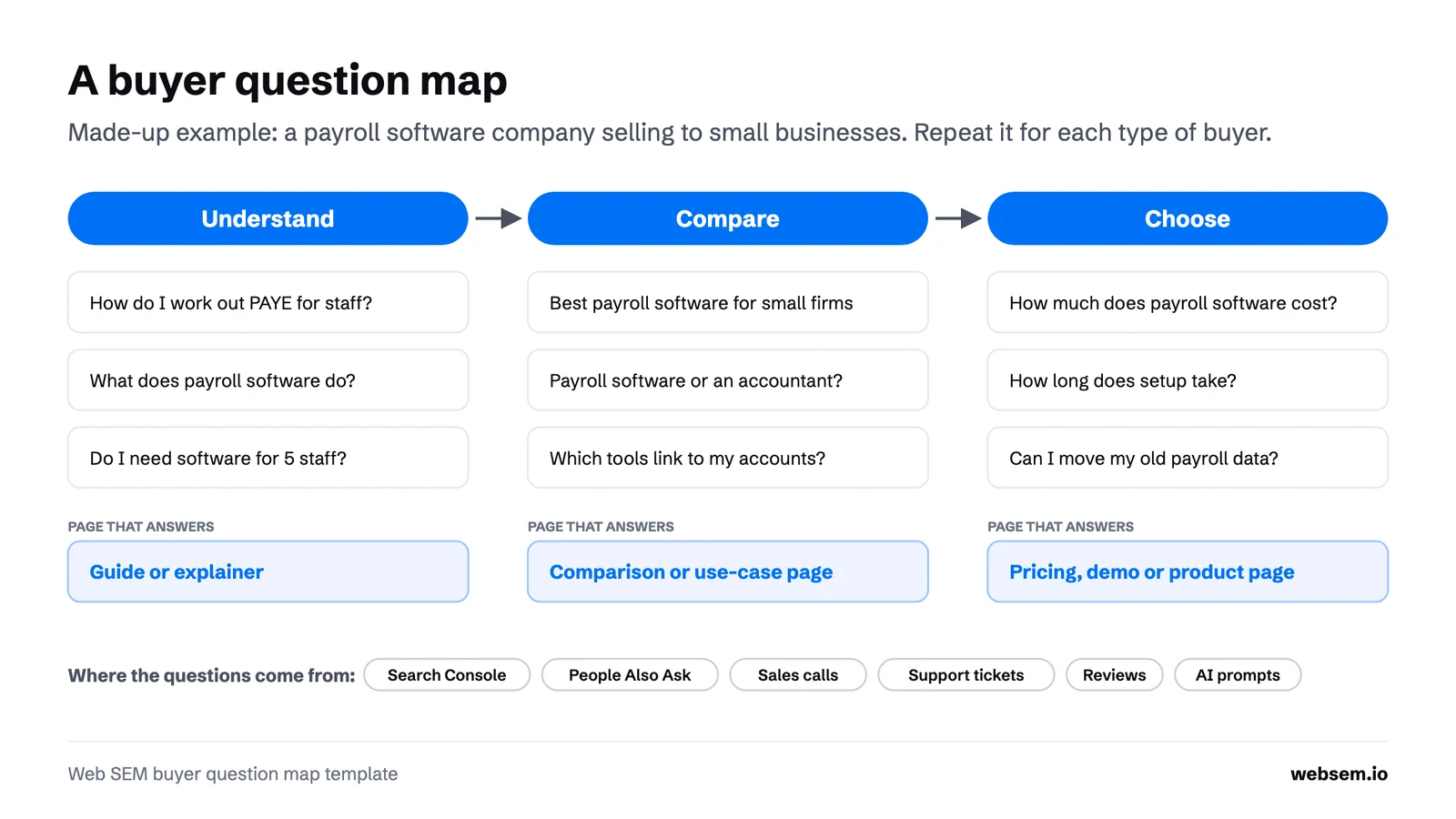
Put each question into one of three stages. Understand questions come early ("what does payroll software do?"). Compare questions weigh options ("payroll software or an accountant?"). Choose questions come just before buying ("how long does setup take?"). Most sites have plenty of Understand content and very little for Compare and Choose, which is where buyers decide.
Repeat it for each type of buyer
A business owner, a finance manager and an HR lead ask different questions about the same product. Build a short map for each buyer type. If you only have time for one, start with the person who signs off the purchase.
Note the signals around the questions
While you collect questions, record four other things: the competitors AI tools name, the categories they put you in, the pain points that come up in sales calls and the exact words customers use in reviews. These shape how you write the pages in step 3 and where you look for proof in step 4.
Give every question a page
For each question, note the page that should answer it. Some questions belong together on one page; some need a page of their own. Where no page exists, you have found a gap for step 3.
Free tools: Google Search Console, Google search (People Also Ask and autocomplete), ChatGPT, Gemini and Perplexity, plus a spreadsheet.
Done when: you have 50 to 150 real questions, sorted by stage and buyer, each with a page that should answer it.
Example: the payroll company's sales team says the question they hear most is "can I move my old payroll data across?". No page on the site answers it, so it goes to the top of the list for step 3.
3Step 3Build pages that answer them first
The third step is to create or rewrite the pages on your question map so each one answers its question in the first lines, then backs the answer up. Buyers skim. AI tools quote short passages. A page that buries the answer in paragraph five loses both.
The page types buyers and AI tools quote
| Page type | What it answers | Example question |
|---|---|---|
| Product or service page | What it is, who it suits, what is included | What does payroll software do? |
| Category page | Which option in a range fits | Which payroll plan suits a 10-person team? |
| Use-case page | How it works for a specific situation | Payroll software for a restaurant with shift staff |
| Comparison page | How you differ from the alternatives | Payroll software or an accountant? |
| Pricing page | What it costs and what changes the price | How much does payroll software cost? |
| Help centre article | How to do a specific task | How do I add a new employee? |
| Guide built on your own data | Facts nobody else can publish | What do small businesses spend on payroll admin? |
Write answer-first
Under each heading, state the answer in one or two sentences, then give the detail: steps, numbers, conditions and examples. Use the buyer's own words from step 2. Keep paragraphs short. Nielsen Norman Group found that visitors read at most 28% of the words on a typical page, so headings, lists and tables do much of the work.
Put proof on the page
Every claim should have something behind it: a review, a client result described by industry, a certification, a statistic with its source or a screenshot. Put proof next to the call to action, not on a separate page. Northwestern University's Spiegel Research Center found that a product with five reviews was 270% more likely to be bought than one with none.
Write titles and descriptions that match the question
Each page needs a title that matches what people search for and a meta description that answers the question and gives a reason to click. Add an FAQ section for the follow-up questions from your map. Google stopped showing FAQ rich results in May 2026, but the questions still help readers and AI tools.
Free tools: your content management system, Google Search Console (to see which searches each page already appears for) and the question map from step 2.
Done when: every important page states its answer in the first lines, carries proof and has a clear next step for the reader.
Example: the payroll company adds a short "Moving from another system" page that answers the data question in its first sentence, lists the three steps and shows how long a typical move takes.
4Step 4Earn proof on other sites
The fourth step is to make sure other trusted sites confirm what your own site says. Search engines and AI tools trust a business more when reviews, directories, media and communities all describe it the same way.
Reviews and forums
Ask every happy client for a review on Google and on the review sites your buyers use, such as Hellopeter, Trustpilot or G2 and Capterra for software. Reply to every review, good or bad. Take part honestly in the communities where your buyers ask questions, such as Reddit, Quora and industry groups. BrightLocal's 2026 survey found that 45% of consumers now use ChatGPT or other AI tools to find local business recommendations. Those tools read reviews and forums.
Media and your network
Peec AI's March 2026 analysis of 30 million sources found that Reddit, YouTube, LinkedIn and Wikipedia were the most cited domains in AI answers. Short YouTube videos that answer buyer questions, guest spots on podcasts, comment in trade press, posts from your team on LinkedIn and mentions on partner sites all add up. Do not write your own Wikipedia page: Wikipedia's rules discourage it and edits that look promotional are removed.
Keep your business facts identical everywhere
Your business name, address, phone number, services, founding year and description should match across your website, Google Business Profile, Bing Places, LinkedIn, directories and review sites. When the facts differ, AI tools have to guess. They may guess wrong.
Free tools: Google Business Profile, Bing Places, the review platforms in your industry and a simple list of every profile you own.
Done when: you have a steady flow of new reviews, your business facts match on every profile and other sites mention you for the topics on your question map.
Example: the payroll company finds that AI answers often cite a software review site where it has four reviews and a competitor has 200. Asking every new client for a review there becomes part of onboarding.
5Step 5Win rankings and AI recommendations
The fifth step is to find the places where you almost win and close the gap. By now your site is readable, your pages answer real questions and other sites back you up. This step points that work at the searches and AI answers that matter most.
Find pages in striking distance
In Google Search Console, filter for pages with average positions from 4 to 20 for valuable searches. Google already sees them as relevant. They usually need a better answer, fresher facts, stronger proof or more internal links. These are often the fastest wins in the whole process.
Check who AI names instead of you
Run 30 to 50 buyer prompts from your question map through ChatGPT, Gemini, Perplexity, Copilot and Google's AI Mode. Record which brands are named and which pages are cited. Ranking and being cited are not the same: Ahrefs found in March 2026 that only about 38% of pages cited in AI Overviews rank in Google's top 10 for the same search.
Close the gaps
Where a competitor is named and you are not, look at the sources the AI cited. If it cites a comparison article, a directory or a review site, that is where your proof needs to be. If it cites the competitor's own page, compare that page with yours and fix what is missing.
Tighten local listings
For any business with a service area, the Google Business Profile often decides the map results and feeds AI answers about local providers. Keep categories, services, hours, photos and posts current. Answer every review.
Free tools: Google Search Console, Bing Webmaster Tools, ChatGPT, Gemini, Perplexity, Copilot and Google's AI Mode.
Done when: you know where you rank for your priority searches, which AI answers name you and who is named instead. Each gap has an owner and a fix.
Example: the payroll company ranks ninth for "payroll software for small business" and is never named by ChatGPT. Its comparison page is rewritten answer-first. It also earns a listing in two comparison articles that ChatGPT cites.
6Step 6Measure, refresh and repeat
The sixth step is to measure the results every month and use them to choose the next round of work. Measurement is what turns SEO from a list of tasks into a process that improves over time.
Set up tracking once
Measurement caught up with AI search in 2026. Google Search Console added generative AI performance reports for all sites in August 2026, showing impressions in AI Overviews, AI Mode and Discover. Google Analytics 4 added an AI Assistant default channel in May 2026 for visits from ChatGPT, Gemini, Claude and similar tools. Bing Webmaster Tools has shown citations in Copilot answers since February 2026.
Keep one monthly report
| What to measure | Where to find it | What it tells you |
|---|---|---|
| Clicks and impressions for priority searches | Google Search Console | Whether you are being found on Google |
| Pages indexed | Search Console Pages report | Whether step 1 is still holding |
| Brand named in AI answers | Your monthly prompt checks or an AI tracking tool | Whether you are being recommended |
| AI impressions and citations | Search Console AI reports, Bing AI Performance | How often AI features show your pages |
| Visits from AI tools | GA4 AI Assistant channel | Whether AI answers send people to you |
| Leads or sales per page | GA4 key events, your CRM | Whether the traffic is worth having |
Refresh what is slipping
Pages lose ground as competitors update theirs and facts go out of date. AI assistants lean towards newer content: Ahrefs found that pages cited by AI assistants were on average 25.7% fresher than pages in normal Google results. Review your 20 most valuable pages at least twice a year and update anything that has changed.
Go round again
Each month's report shows which step needs attention: new pages not indexed (step 1), new questions from sales (step 2), pages that rank but do not convert (step 3), competitors with more reviews (step 4) or new gaps in AI answers (step 5). Run the full loop at least once a quarter.
Free tools: Google Search Console, Google Analytics 4, Bing Webmaster Tools and a spreadsheet or dashboard.
Done when: you have one monthly report that everyone reads. Each month ends with a short list of fixes for the next round.
Example: the payroll company's report shows AI Assistant visits converting at twice the rate of other organic visits, so it moves more time to the comparison and pricing pages that AI answers cite.
How long the SEO process takes
Google's own SEO Starter Guide notes that some changes take effect within hours while others take months. In our experience, technical fixes and page rewrites show up within weeks. Reviews, mentions and topic coverage build over three to six months and beyond. The times below are planning estimates for a typical business site.
| Step | First pass | After that |
|---|---|---|
| 1. Crawl and read | 1 to 4 weeks, depending on developer time | A check every month |
| 2. Buyer questions | About a week | Update every quarter |
| 3. Answer-first pages | Two to four key pages a month | Ongoing |
| 4. Proof on other sites | Start in month one | Ongoing, monthly |
| 5. Rankings and AI | First check in month one | Monthly |
| 6. Measure and refresh | Set up in week one | Monthly report, quarterly loop |
Common mistakes when doing SEO
- Starting with content before the site is readableNew pages on a site with indexing or crawler problems may never be seen.
- Building a keyword list instead of a question mapKeywords tell you what people type. Questions tell you what they need to know before they buy.
- Writing only Understand contentGuides attract visitors; comparison, pricing and use-case pages win the buyers.
- Ignoring what other sites say about youAI tools weigh reviews, listings and mentions heavily. Your own site is only part of the picture.
- Measuring traffic without leadsClicks are falling on many informational searches. Leads, sales and AI mentions show whether SEO is working.
- Treating SEO as a project with an end dateCompetitors, AI answers and buyer questions keep changing. The loop is the point.
Sources
- StatCounter: search engine market share worldwide (October 2026)
- Google: Sundar Pichai at I/O 2026, AI Overviews and AI Mode users (May 2026)
- Google Search Central: AI features and your website
- Google Search Central: optimizing your website for generative AI features (May 2026)
- Google Search Central: SEO Starter Guide
- Google Search Central: FAQPage structured data
- Google Search Central: generative AI performance reports (June 2026)
- Ahrefs: how SERP features have evolved in the AI era (July 2025)
- Ahrefs: 38% of AI Overview citations pull from the top 10 (March 2026)
- Ahrefs: brand visibility factors in ChatGPT, AI Mode and AI Overviews, 75,000 brands
- Ahrefs: AI assistants prefer to cite fresher content (July 2025)
- Peec AI: most cited domains in AI search (March 2026)
- BrightLocal: Local Consumer Review Survey (2026)
- HTTP Archive: Web Almanac 2025, performance
- Vercel: the rise of the AI crawler
- Nielsen Norman Group: how little do users read?
- Spiegel Research Center: how online reviews influence sales
- Bing Webmaster Blog: AI Performance in Bing Webmaster Tools (February 2026)
Frequently asked questions about how to do SEO
Work through six steps in order. Make the site easy to crawl and read, map the questions your buyers ask, build pages that answer them first, earn proof on other sites, win rankings and AI recommendations, then measure the results and repeat.
Start with step 1 even if it feels technical. Pages that search engines and AI tools cannot read will not rank or be quoted, however good the writing is.
Yes. Most of this process needs free tools (Google Search Console, Google Analytics 4 and Bing Webmaster Tools), knowledge of your business and regular time each month. Many owners handle steps 2, 3 and 4 well because they know their buyers best.
Technical fixes in step 1 and site-wide changes may need a developer. An agency is most useful when you lack the time to run the loop every month or need help with the technical and measurement steps.
Technical fixes and rewrites of existing pages often show results within weeks. New pages, reviews, mentions and broader topic coverage usually take three to six months to build momentum. In competitive markets they take longer.
Google's own SEO Starter Guide notes that some changes take effect within hours while others take months. Measure monthly so you can see progress before the big gains arrive.
The six steps are: make your site easy to crawl and read, map buyer questions, build answer-first pages, earn proof on other sites, win rankings and AI recommendations, then measure, refresh and repeat.
Older SEO processes started with keyword research. Starting with buyer questions works better now, because both buyers and AI tools work in questions.
The foundations are the same. Google says there are no extra requirements to appear in AI Overviews or AI Mode. AI assistants still need pages they can fetch and trust.
What has changed is the emphasis: answers in the first lines of each section, proof on other sites, consistent business facts and tracking whether AI tools name you, not just where you rank.
Google Search Console, Bing Webmaster Tools, Google Analytics 4, PageSpeed Insights, the Rich Results Test and the Schema Markup Validator cover most of the process. Add ChatGPT, Gemini and Perplexity for checking AI answers.
A spreadsheet is enough for the question map and the monthly report. Paid tools save time at scale, but they are not needed to start.


