Google has removed the Google Search button from its desktop homepage. Three AI shortcuts now sit under the search box (Create images, Ask about files and Brainstorm) and signed-in users get a collapsible sidebar that lists their recent AI Mode conversations. Pressing Enter still runs a normal search. The change began rolling out worldwide on 19 November 2026. It shows where Google wants searches to start: in a conversation, not a list of links.
What changed on the Google homepage
For more than two decades the Google homepage was a logo, a search box and two buttons. The new desktop layout keeps the logo and the box but changes what sits around them.
- The Search button is goneIt had become close to redundant. Most people press Enter or pick an autocomplete suggestion. The suggestion list also often covered the button while you typed.
- Three AI shortcuts take its placeCreate images, Ask about files and Brainstorm each open AI Mode with that task ready to go.
- A sidebar keeps your AI conversationsFor signed-in users, a narrow strip on the left opens into a list of recent AI Mode threads. You can start a new chat, search old ones and pick up a thread where you left off. Reports say it appears on the results page too.
- I'm Feeling Lucky survivesGoogle has tested an AI Mode button in its place before, so it may not last.
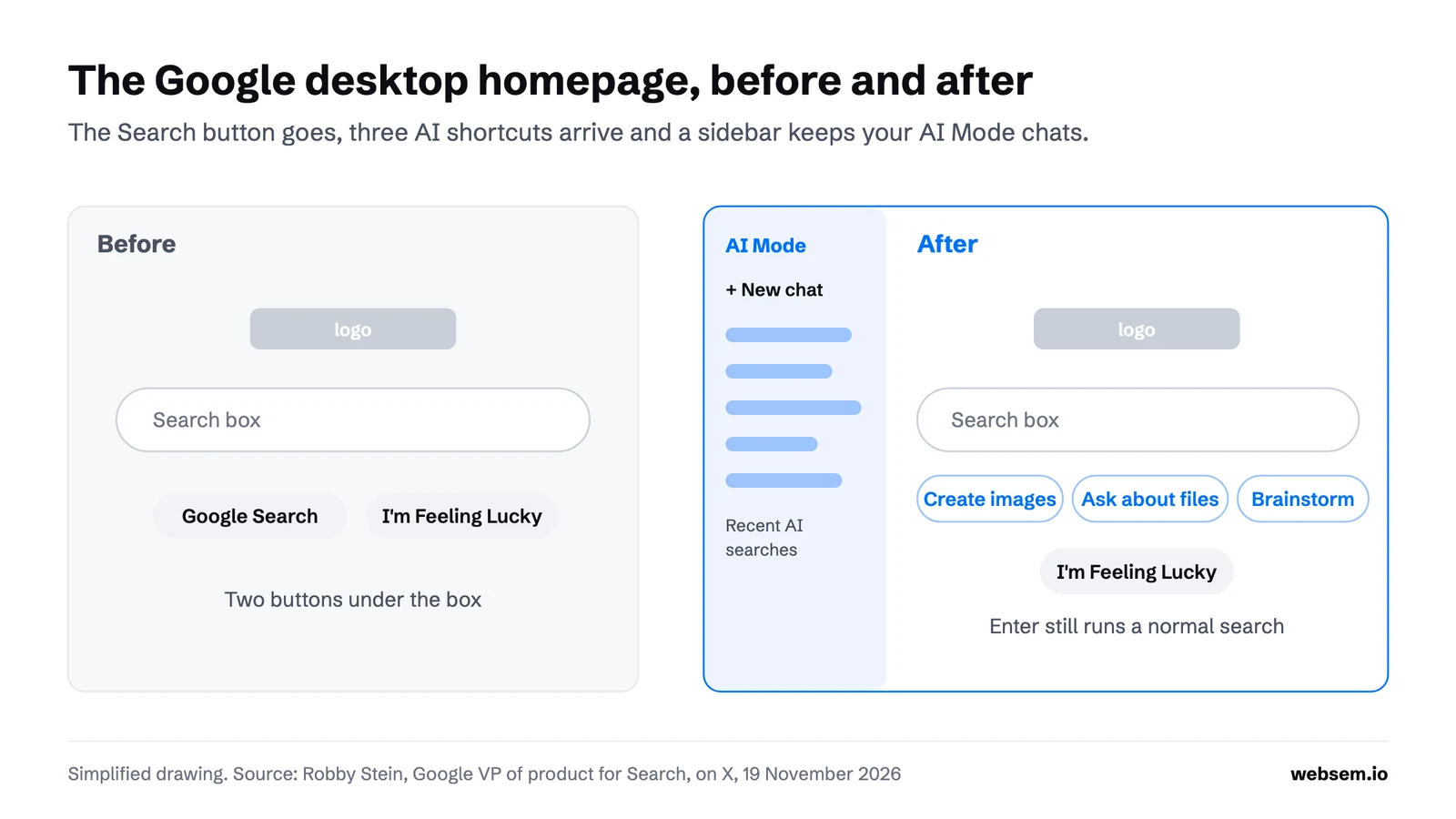
The rollout is gradual. When we checked google.co.za from Cape Town on 25 November 2026 while signed out, the homepage still showed both buttons, with an AI Mode button inside the search box. Signed-out visitors will not get the sidebar at all, because it depends on account history. Google has not said when the Google app or the mobile site will follow.
What stays the same
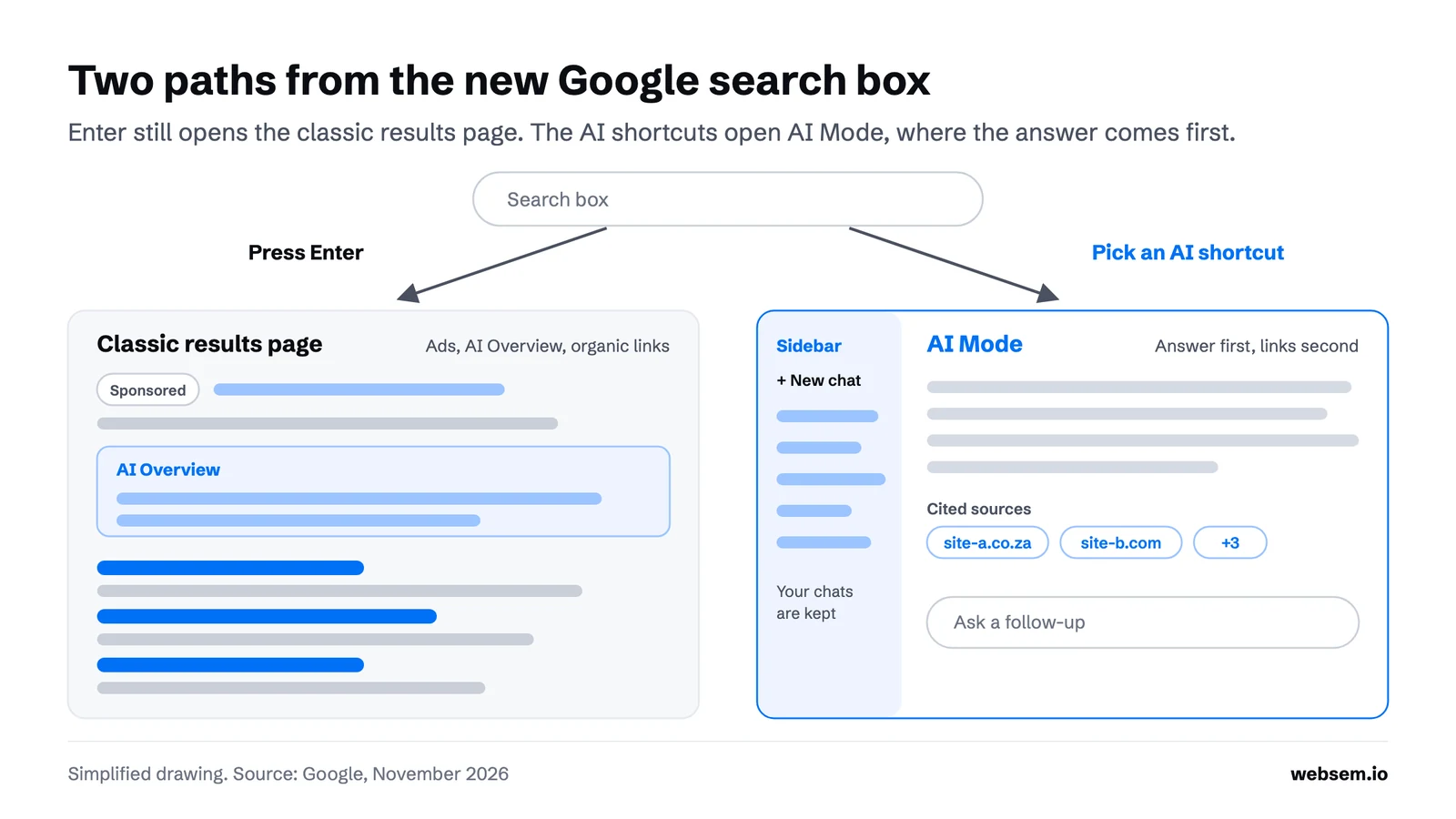
Classic search has not been removed. Enter, Return and autocomplete suggestions all still lead to the familiar results page with ads, AI Overviews and organic listings. AI Mode only answers when you choose it. The change is about what Google puts in front of you before you type, not what happens after.
Why Google made the change
Stein said people now bring questions that are "not just one and done". In Google's testing, the sidebar helped them keep exploring instead of starting over. Until now an AI Mode conversation was easy to lose once you closed the tab. With the sidebar it behaves more like a chat app with a history.
The redesign follows the announcements Google made at its I/O conference in May 2026 (Google). By Google's own figures, AI Mode had passed one billion monthly users and queries in AI Mode had more than doubled every quarter since launch. Gemini 3.5 Flash became its default model. Google also launched what it called the biggest upgrade to the search box in over 25 years: a box that grows as you type and accepts images, files, videos and Chrome tabs. Dropping the Search button is the homepage catching up with that box.
Search is becoming a workspace
The sidebar is the bigger change. It turns Search from one-off questions into ongoing projects, closer to ChatGPT or the Gemini app than to a page of ten links. Other features Google announced this year point the same way:
- Information agents that watch the web for changes in the background, starting with Google AI Pro and Ultra subscribers.
- Agentic booking for local services in the US, where Google can call businesses for you in categories such as home repair, beauty and pet care.
- Personal Intelligence in AI Mode, available in nearly 200 countries and territories, which can draw on Gmail and Google Photos once a user connects them.
- Temporary AI Mode threads, which are not saved to Search history or used for personalisation.
It also creates a two-tier homepage. Signed-in users get history, follow-ups and personal context. Signed-out users see the AI shortcuts but no memory of past conversations.
What it means for website traffic
Google is putting its AI tools in the most visible spot on its busiest page. Every search that starts in AI Mode is one where the answer is written for the user first and links come second. Critics, including the German tech publisher heise, argue that this means even fewer visits for websites and less money for the publishers whose content AI answers are built on.
There is data behind the concern. In a Pew Research Center study of 900 US adults' browsing in March 2025, people clicked a search result in 15% of Google visits without an AI summary and in 8% of visits with one. They clicked a link inside the AI summary in just 1% of visits.
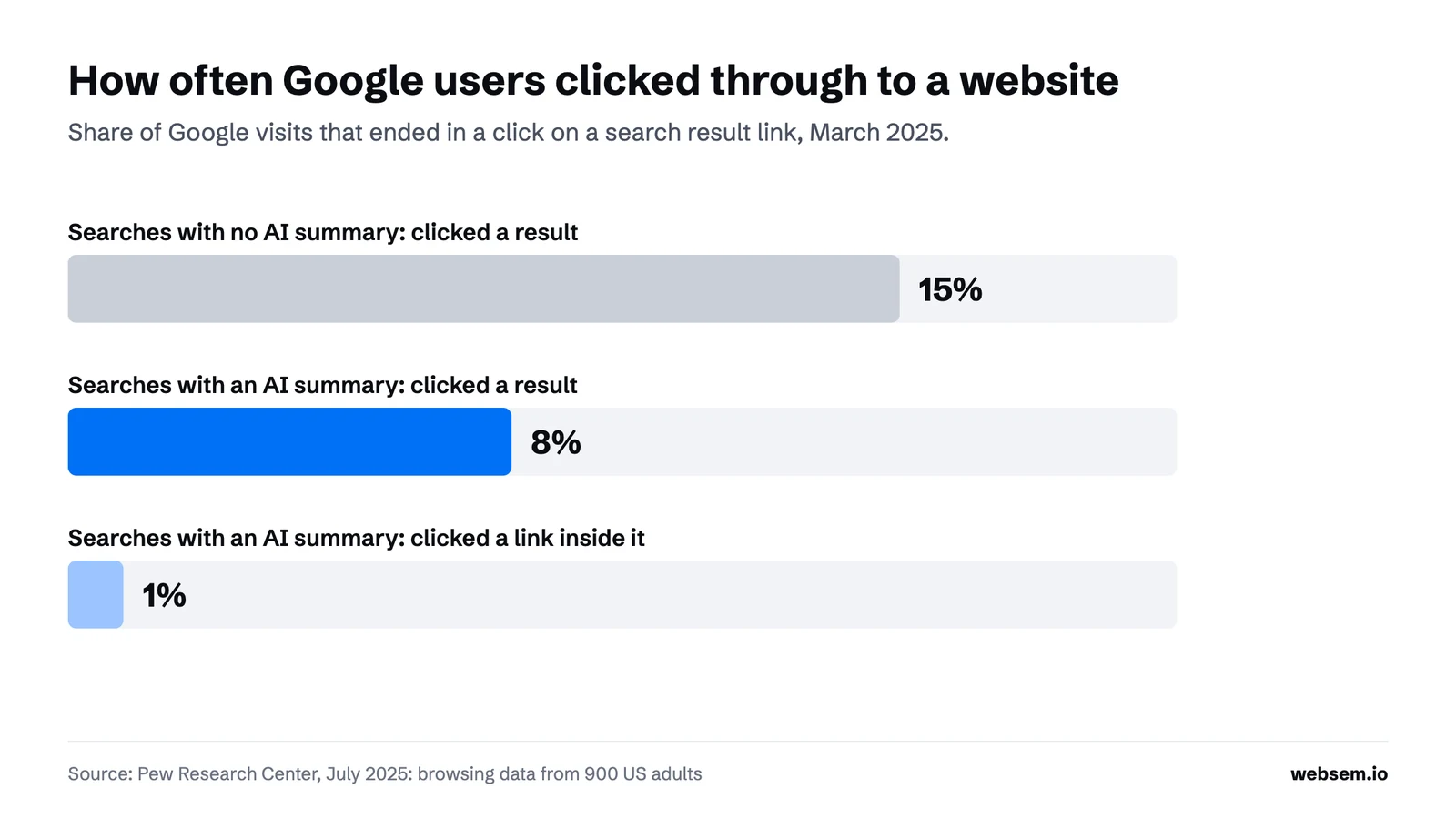
AI Mode goes further than AI Overviews. The whole page is the answer and follow-up questions stay inside the conversation. The sidebar makes it easier to return to that conversation than to a website. Visits will not vanish overnight, since Enter still runs a normal search. But the direction is clear: being the source an AI answer cites now matters as much as ranking.

What businesses should do now
- Answer questions directlyOpen each important page with a clear two- or three-sentence answer, then give the detail. AI Mode lifts passages, so make the key passage easy to quote.
- Cover the follow-up questionsA sidebar built for research over several steps rewards sites that answer the next question as well as the first: comparisons, timelines, what it involves and what can go wrong.
- Keep your facts consistentYour website, Google Business Profile and directory listings should agree on your services, areas, hours and contact details. AI answers pull from all of them.
- Use structured data that matches the pageOrganization, product, FAQ and article schema help Google understand who you are and what each page covers.
- Track AI visibility, not just rankingsSearch Console counts AI Mode clicks and impressions within its web search reports. Pair that with checks on whether AI answers mention and link to your brand for the questions your buyers ask.
- Judge search by leads, not only clicksFewer but better-informed visitors can still bring more enquiries.
A note for teams on Google Workspace
To reopen past AI searches, Search history and personalised recommendations must be switched on. On Workspace accounts where Search is turned off, an admin has to enable Search history first. Threads can be deleted one at a time or all at once, though Google says deleted searches can stay in My Activity for up to 24 hours. Check Google's saved-media settings before staff upload client documents through Ask about files, because uploads can be used to improve Google's AI unless you opt out.
Ranked in the results, cited in the answers
The Search button was small, but removing it says a lot. Google wants the first thing people do on its homepage to be a conversation with AI. The sidebar is built to keep them in that conversation. Classic results are not going anywhere yet, so businesses need to be visible in both places: ranking in the results and cited in the answers.
Frequently asked questions
Yes, on the desktop homepage. Google began rolling the change out worldwide on 19 November 2026, so some people will see the old layout for a while yet. You can still run a normal search by pressing Enter or picking an autocomplete suggestion, which is how most people searched anyway. The I'm Feeling Lucky button is still there for now. Three AI shortcuts take the Search button's place under the box: Create images, Ask about files and Brainstorm.
It is a collapsible panel on the left of the desktop homepage for signed-in users. It lists your recent AI Mode conversations so you can reopen one and carry on where you left off, search your past threads or start a new chat. Reports say it shows on the results page too. Before the sidebar, an AI Mode conversation was easy to lose once you closed the tab. Now Search keeps a history, much like a chat app.
Yes. Type your search and press Enter and you get the regular results page with ads, AI Overviews and organic listings. AI Mode only answers when you choose it, for example by clicking one of the new shortcuts. The results page may still show an AI Overview at the top, because that is a separate feature from AI Mode. If you use AI Mode but would rather your chats were not kept, temporary threads are not saved to Search history or used for personalisation.
The rollout is gradual and on desktop only, so it can take days or weeks to reach every account and country. When we checked google.co.za from Cape Town on 25 November 2026 while signed out, the homepage still showed both buttons. The sidebar also needs you to be signed in with Search history switched on. On Google Workspace accounts an admin may have to enable Search history first. Google has not given a date for the Google app or the mobile site.
You can collapse the sidebar to a narrow strip and delete threads one at a time or all at once. Google says deleted searches can stay in My Activity for up to 24 hours. Temporary AI Mode threads are never saved in the first place. Signed-out visitors do not get the sidebar at all, because it depends on account history.
Indirectly. Rankings work the same way, but the homepage now steers more searches into AI Mode, where the answer comes first and links come second. In a Pew Research Center study, people clicked a search result in 8% of Google visits with an AI summary against 15% without one, so fewer clicks is the likely result. To stay visible, open key pages with a clear answer, keep your business facts the same across your site and listings, use structured data that matches the page and track whether AI answers cite your brand as well as where you rank.